| Ascendo Money for BlackBerry Virtual Tour | |
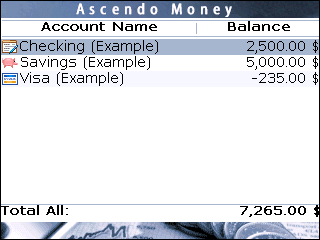 |
The accounts screen displays the account balances and total for all accounts, or net worth. From the account screen you can modify accounts
and display the transactions registers for each account. Other options available from the accounts screen include managing payees, categories, type, payment methods, budgets and displaying reports.
|
|
Previous Top Next |
|
| Ascendo Money for BlackBerry Virtual Tour | |
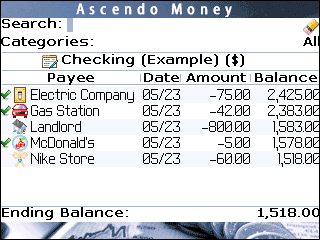 |
The account register displays the fields of each deposits and withdrawals and the running balance. The
ending balance for the account is displayed at the bottom of the screen. All of the information in your account can be accessed very quickly using Roll & ScrollTM to move up and down through transactions and horizontally across fields. The register can be completely customized by setting display options for font size, font family, scrolling method, field ordering, field size and alignment. |
| Ascendo Money for BlackBerry Virtual Tour | |
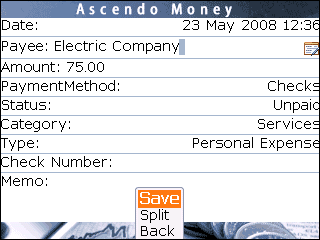 |
The transaction screen
displays all the fields of a deposit or withdrawal. To speed data entry,
Ascendo Money implements many time saving features.
As you start entering payees, Ascendo Money suggests payees already in the database. for example, if you type "e", you will see the first payee starting with "e" appear in the field after cursor. If you click on the return field, Ascendo Money will auto-complete the field and set the default values for payment method, status, category and type. |
| Ascendo Money for BlackBerry Virtual Tour | |
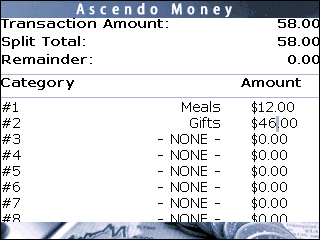 |
Each transaction amount can
be split across several categories. For example, you might purchase food
and gifts in an airport store and classify the food as a business
expense and the gifts as a personal expense.
Ascendo Money will display the total of the amounts you have allocated in the Split Total field. The difference between the transaction amount and the total allocated is displayed in the remainder field. |
| Ascendo Money for BlackBerry Virtual Tour | |
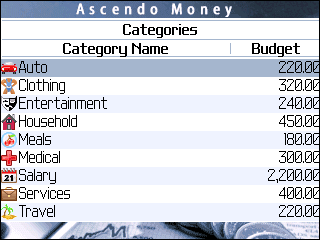 |
Budget planning starts with specifying a monthly budget amount for each category. For example, you might want to spend less than $200 per month on clothing. If you buy a shirt and jeans for $100, you have spend 50% of your budget. |