|
|
|

Virtual Tour
|
Are you looking for a better way to manage your personal finances? Ascendo Money can help you track your spending, meet budgets, pay your bills on time and plot your course to financial freedom.
Ascendo Money is the most comprehensive money manager for BlackBerry & PC Desktops. Advanced features like budget analysis, transaction scheduling, account reconciliation, reports, graphs, synchronization and online bank access give you the control to achieve your financial goals.
Powerful features and an intuitive interface have made Ascendo Money the best-selling personal finance manager for BlackBerry.
|
|
Benefits |
 Ascendo Money gives you the tools to achieve your financial goals. Ascendo Money gives you the tools to achieve your financial goals.
|
Ascendo Money simplifies managing your finances by allowing you to enter information on the go and synchronize with your desktop. |
Ascendo Money supports import/export in several formats to facilitate data exchange with Intuit Quicken, Microsoft Money and other 3rd party applications. |
|
|
 WHAT A PRODUCT! WHAT A PRODUCT! |
| by Steven Hitchye from Kansas City, Mo |
| "This is a awesome product. I got it because it was more detail in the transactions but it does so much more.
I am learning new things everyday... This product turned out to be way more than I thought. I got my money's worth and then some. I HIGHLY recommend
this product for its ease of use, convenience, and the many, many, many features it has."
|
|
| See all Reviews |
|
|
|
| Features |
|
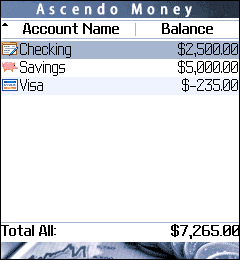
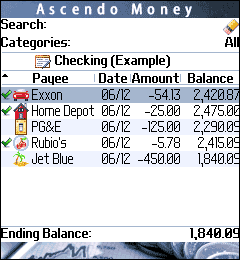
Ascendo Money for BlackBerry |
|
 |
- Create unlimited number of accounts for credit cards, checking, savings and investments.
- Manage a transaction register for each account.
- Record payee, date, amount, category, type, payment method, status, memo and a user defined field for each transaction.

- Enter transactions quickly using auto-complete to select payees and default field values based on payee.
- Access information intuitively using Roll & ScrollTM to move up and down through transactions and horizontally across fields.
- Set budgets for categories and compare to actual amounts spent.
- Split transactions over several categories.
- Schedule recurring transactions.
- Make transfers from one account to another.
- Forecast account balances at future dates.
- Reconcile accounts with bank statements.
- Generate numerous reports and display pie charts and bar graphs of data.
- Securely download information from your bank accounts. (Try free trial to verify that your bank is supported).
Click here for a more detailed description of Ascendo Money for BlackBerry.
|
| The Gold Standard |
| A reviewer from California |
| "Ascendo Money is the ultimate tool to support financial responsibility. Pop it on your Blackberry, make a
purchase or deposit and immediately enter the information. It's like a high-tech checkbook for ALL your accounts. And that's good because
balancing my checkbook has never been something I've done with consistency. With Ascendo Money, I've got no excuse..."
|
|
| See all Reviews |
|
|
|
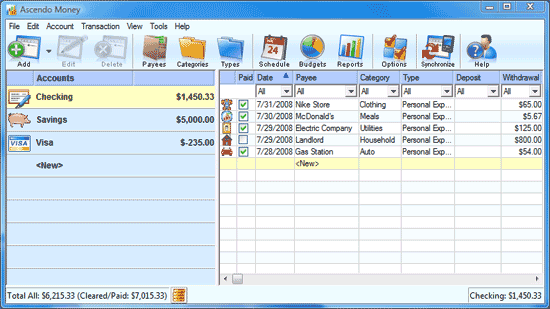
Ascendo Money Desktop for Windows PCs |
 |
- Synchronize financial information with Ascendo Money for BlackBerry.
- Display accounts and registers in single view.
- Show balances for all transactions, and cleared transactions.
- Set budgets and track spending by category.
- Schedule recurring transactions.
- Reconcile account balances.
- Forecast balances at future dates.
- Import & Export in Quicken Interface Format (QIF) to exchange information with Intuit Quicken (Version 2008, 2004 & earlier), Microsoft Money and other personal financial managers.
- Import & Export in Comma Separated Values (CSV) format to exchange information with Excel, Access, File Maker and other 3rd party applications.
- Backup and Restore data files.
- Windows 8, Windows 7 and Vista Compatible.
|
| Exceptional Product and World Class Customer Support |
| A reviewer from Beverly Hills, California |
| "This is a fantastic alternative to the more time-intensive Money or Quicken programs for desktop. It utilizes the
convenience of the Blackberry, offers impressive customer support, and will save you from the expenses of financial mismanagement... Ascendo is
the clear winner in this software category with regards to functionality, features, support, and price. Excellent. Glad I bought. :)"
|
|
| See all Reviews |
|
|
|
| Awards & Certificates |
|
- Pinstack.com
Selected as one of the winners of the Pinstack Five Star award. "Judged by members of PinStack's professional discussion forums, the PinStack Five Star Award is designed
to recognize exceptional BlackBerry applications developed by outstanding companies."
- Handango: 5-Stars. Ascendo Money has more
5 Star reviews than any other personal finance manager for BlackBerry.
- Mobihand: 5-Stars.
- PDATopSoft: 5-Stars.
- BlackBerry Alliance member.
|
|

|
|
|
| Sales Partners |
|
|
|
|
| Special Offers |
|
|
Did you purchase another personal finance manager for BlackBerry and
find that you are not satisfied? Ascendo offers Competitive Upgrades to make the switch.
For more information, send an email to info AT ascendo-inc DOT com
including the name of the product you are considering switching from.
Are you moving to BlackBerry from Palm OS, Windows Mobile or another handset? Did you purchase a personal finance manager on your
previous handset? If so, Ascendo offers cross-over pricing. For more
information, send an email to info AT ascendo-inc DOT com
including the name of the product you purchased on your previous
handset.
|
|
|
|
|